Learn how to authenticate users with the Client-Initiated Backchannel Authentication Flow.
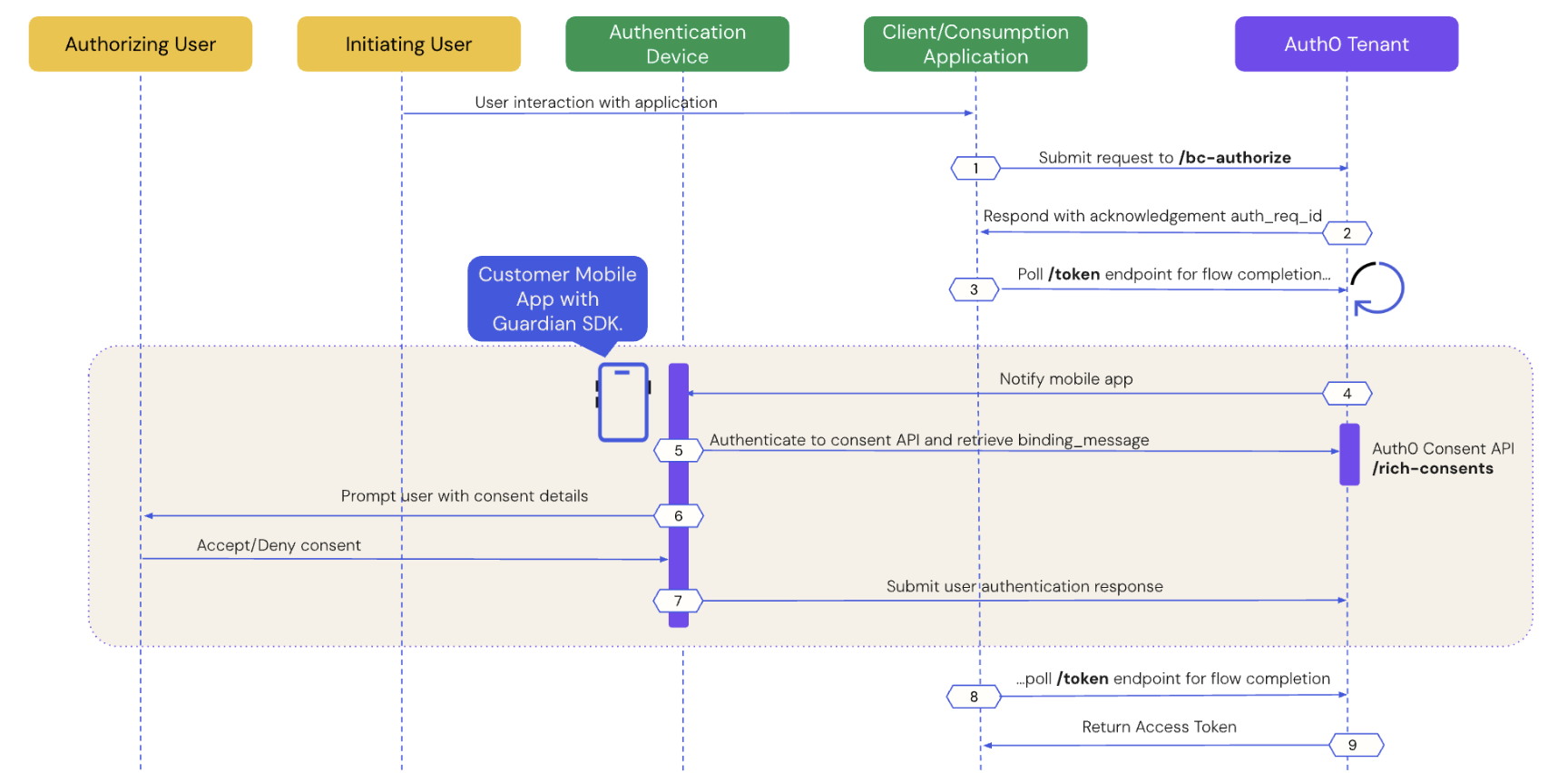
Client-Initiated Backchannel Authentication (CIBA) does not rely on a client application redirecting the user via the browser to perform the login/authentication process. Instead, the client application directly calls the Provider via a backchannel request to initiate the authentication flow.The following sequence diagram illustrates an implementation of the CIBA Flow:
The sequence diagram defines two actors: an authorizing user and an initiating user. The authorizing and initiating user can be two different entities, such as an AI agent performing a task on a user’s behalf. In other use cases, they can be the same entity, such as a user authenticating to a retail kiosk or another connected device.The following sections dive step-by-step into how user authentication works with the CIBA Flow:
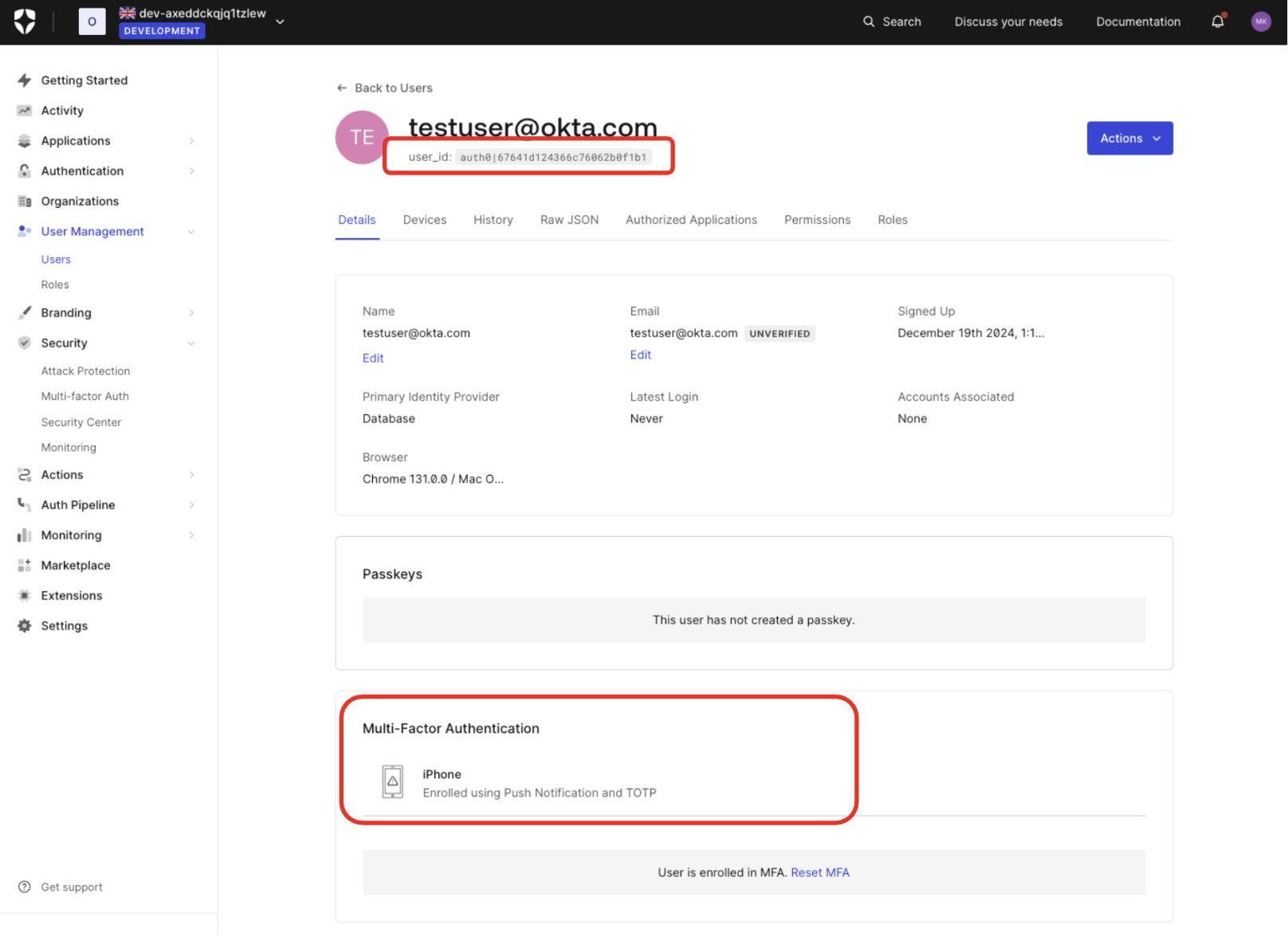
If you have set as always required for your tenant, users are prompted to enroll for MFA at their next login. You can also use Actions to prompt for MFA enrollment.
Step 1: Client application initiates a CIBA request
Use the User Search APIs to find the authorizing user for whom you’d like to initiate a CIBA request and obtain their user ID.Once you have a user ID for the authorizing user, use the Authentication API or our SDKs to send a CIBA request to the /bc-authorize endpoint:
Client authentication method used for user authentication with CIBA, such as Client Secret, Private Key JWT, or mTLS Authentication. If you’re using Private Key JWT or mTLS, you don’t need to include the client secret.
scope
Must include openid.
The scope can optionally include offline_access to request a refresh token. However, for one-time authorization of a transaction with the CIBA Flow, a refresh token is not needed and does not have any meaning in this context.
user_id
User ID for the authorizing user that is passed within the login_hint structure. If iss_sub format is used, then the user ID is passed within the sub claim.
The user ID for a federated connection may have a different format.
request_expiry
The CIBA flow’s requested expiry is between 1 and 300 seconds, and it defaults to 300 seconds. Include the request_expiry parameter to set a custom expiry for the CIBA flow.
binding_message
Human-readable message used to bind the CIBA flow across the authentication and consumption devices. The binding message is required and up to 64 characters. Use only alphanumeric and +-_.,:# characters.
There is a user-specific rate limit where the authorizing user will not be sent more than 5 requests per minute.
Use the Authentication API or our SDKs to call the /token endpoint using the urn:openid:params:grant-type:ciba grant type and the auth_req_id you received from the /bc-authorize endpoint:
Until the authorizing user approves the transaction, you should receive the following response:
Report incorrect code
Copy
Ask AI
{ "error": "authorization_pending", "error_description": "The end-user authorization is pending"}
There is approximately a five-second wait interval for polling. If you poll too frequently, you will receive the following response, where the description varies depending on the backoff interval:
Report incorrect code
Copy
Ask AI
{"error": "slow_down","error_description": "You are polling faster than allowed. Try again in 10 seconds.""interval": 10}
To resolve the error, wait until the next interval (in seconds) to poll the /token endpoint.
Step 4: Mobile application receives the push notification
Auth0 sends a push notification to the user’s registered mobile app or device. The Guardian SDK provides methods to parse the data received from the push notification and return a ready-to-use Notification instance. The Notification instance includes a transaction linking ID, or txlinkid, that the mobile application uses to retrieve the consent details from Auth0.The following code samples are example iOS and Android mobile push notification implementations using the Guardian SDK:
iOS
Android
Report incorrect code
Copy
Ask AI
//implementing UNUserNotificationCenterDelegatefunc userNotificationCenter(_ center: UNUserNotificationCenter, willPresent notification: UNNotification, withCompletionHandler completionHandler: (UNNotificationPresentationOptions) -> Void) { let userInfo = notification.request.content.userInfo if let notification = Guardian.notification(from: userInfo) { // Implement this function to display the prompt and handle user's consent/rejection. handleGuardianNotification(notification: notification) }}
Report incorrect code
Copy
Ask AI
// at the FCM listener you receive a RemoteMessage@Overridepublic void onMessageReceived(RemoteMessage message) { Notification notification = Guardian.parseNotification(message.getData()); if (notification != null) { // you received a Guardian notification, handle it handleGuardianNotification(notification); return; } /* handle other push notifications you might be using ... */}
Step 5: Mobile application retrieves the consent details
Call the Guardian SDK from your mobile application to retrieve the consent details i.e. the contents of the binding_message from the Auth0 Consent API.The following code samples are example iOS and Android implementations that retrieve data from the Auth0 Consent API:
iOS
Android
Report incorrect code
Copy
Ask AI
let device: AuthenticationDevice = // the object you obtained during the initial Guardian SDK enrollment process and stored locallyif let consentId = notification.transactionLinkingId { Guardian .consent(forDomain: {yourTenantDomain}, device: device) .fetch(consentId: consentId, notificationToken: notification.transactionToken) .start{result in switch result { case .success(let payload): // present consent details to the user case .failure(let cause): // something went wrong } }}
Report incorrect code
Copy
Ask AI
Enrollment enrollment = // the object you obtained during the initial Guardian SDK enrollment process and stored locallyif (notification.getTransactionLinkingId() != null) { guardian .fetchConsent(notification, enrollment) .start(new Callback<Enrollment> { @Override void onSuccess(RichConsent consentDetails) { // present consent details to the user } @Override void onFailure(Throwable exception) { // something went wrong } });}
Step 6: Mobile application presents the consent details to the user
The Auth0 Consent API responds to the mobile application with the consent details, including the binding_message, scope, and audience. The scopes returned to the mobile application are filtered according to your RBAC policy. To learn more, read Role-Based Access Control.The mobile application presents the authentication request and/or the consent details to the user.The following code sample is an example response from the Auth0 Consent API:
Step 7: Mobile application sends the user response back to Auth0
Depending on whether the user accepts or rejects the authentication request, the mobile application sends the user response back to Auth0.The following code samples are example iOS and Android implementations that handle the user response:
Guardian .authentication(forDomain: "{yourTenantDomain}", device: device) .allow(notification: notification) // or reject(notification: notification, withReason: "hacked") .start { result in switch result { case .success: // the auth request was successfully rejected case .failure(let cause): // something failed, check cause to see what went wrong } }
Report incorrect code
Copy
Ask AI
guardian .allow(notification, enrollment) .execute(); // or start(new Callback<> ...)
Guardian .authentication(forDomain: "{yourTenantDomain}", device: device) .reject(notification: notification) // or reject(notification: notification, withReason: "hacked") .start { result in switch result { case .success: // the auth request was successfully rejected case .failure(let cause): // something failed, check cause to see what went wrong } }
Report incorrect code
Copy
Ask AI
guardian .reject(notification, enrollment) // or reject(notification, enrollment, reason) .execute(); // or start(new Callback<> ...)
Step 8: Auth0 receives user response after the flow completes
The client application completes the polling upon receiving a response from the /token endpoint. A CIBA flow always requires a response, either an approval or decline, from the authorizing user, and existing grants are not checked.